Know what you want to ask.
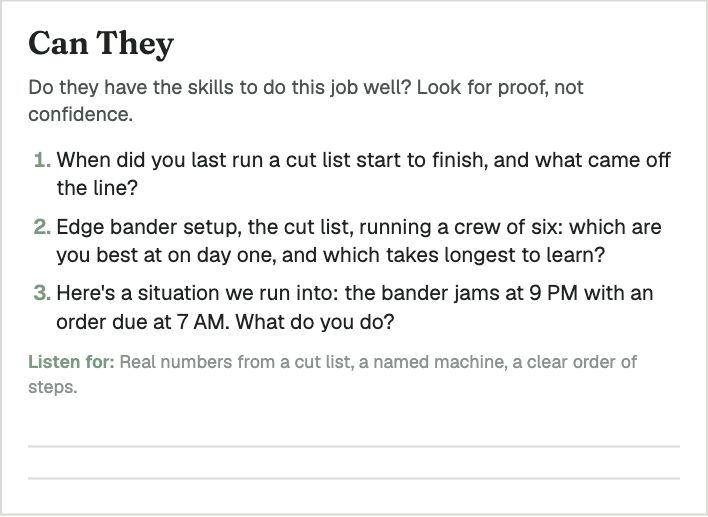
Prepare questions for the role you’re filling, with a scorecard to record what you hear. Use the same criteria when you compare candidates.
Give people a place to apply, keep their resumes and your notes together, and see what needs to happen next. Start with the free plan, or choose the paid plan for interview scorecards, candidate write-ups and a careers page designed for your company.
One user. One active role. No credit card required. Explore the hiring tools
You talked last week. The resume is in your inbox, but where are the notes? Keep them with the candidate in Rosie, along with what needs to happen next.
Review new applicants, find the people you want to talk to and keep track of who’s ready for a decision. Each candidate’s resume and notes stay together.
Someone you spoke with last month might be right for this opening. Find their record and see what you discussed before you reach out again.
Open Rosie’s daily view to see what needs attention. The candidate’s details and next action are there when you’re ready to get to work.
Share a careers page that explains your business and makes applying straightforward. People can introduce themselves even when you don’t have an opening.
Use Rosie to prepare your questions, draft a candidate summary and put an offer in writing. You review the drafts and make the hiring decisions.
Prepare questions for the role you’re filling, with a scorecard to record what you hear. Use the same criteria when you compare candidates.
Use your notes or a transcript to draft a candidate summary. Review the experience, pay expectations and availability before sharing it with the people making the hiring decision.
Experience: Alex coordinates the daily schedule for 12 field technicians.
Looking for: $28 to $30 per hour.
Available: After two weeks’ notice.
Prepare an offer letter from the details of the role. Review the terms, make your edits and send it when you’re ready.
Position: Office Manager
Compensation: $29.00 an hour
Start date: November 16, 2026
A draft you can review and tailor before sending.
Illustrative examples using fictional details.
Coming soon: a recruiting assistant inside Rosie. We’re building it to help with scheduling, follow-ups and routine recruiting administration. It is in development and is not available yet.
A good candidate may find your business before you have a job to post. Give them a place to introduce themselves. Add your careers-page link to your website, email signature and social profiles so people know where to go.
Illustrations using fictional businesses.
Enter your name, work email and company. Verify your email to open your free Starter account.
Give people one place to apply for an open role or introduce themselves for the future. Applications arrive in Rosie, with an email notification.
Read resumes, record your notes and decide who to talk to. When you need interview scorecards, custom branding or access for your team, move to the paid plan.

We built Rosie to manage hiring for our clients. We use it to keep candidate details together, prepare for interviews and follow up on the next step. You can use those same tools to manage hiring for your business.
Meet the people behind Rosie →“One advantage big companies have in hiring is that they show up. Every small business should have a place where people can learn about the company and introduce themselves, even when there isn’t an opening.”
Jay Metcalf, Founder & Managing Partner, Metcalf Search
Some of the businesses and teams using MS Rosie:







I want to keep the branded MS Rosie careers page active. I know I’ll be hiring agents in the coming months.
Leader, real estate brokerage · Columbus, Ohio
Start free with one user and one active role, or set up your careers page before you need to hire. The paid plan adds up to five users, unlimited active roles and help preparing interview scorecards and candidate write-ups.
$0
One user. One active role.
Publish your free careers page and collect introductions, even when you have no openings.
$99 a month
Five users. Unlimited active roles.
Built-in AI helps you prepare for interviews and write up candidates. No separate AI subscription required.
Annual billing saves $198 and includes a phone or video call to help you get set up.
Already using Starter? Upgrade your existing account.
Monthly or annual billing. Job advertising and recruiting services are separate. See plan, billing and data-download details. Review the software terms and privacy policy before subscribing.
Refer a company that becomes a paying customer and receive a 10% discount while they remain subscribed. Questions about referrals?
Both plans include your careers page, candidate records and offer letters. The paid plan adds built-in AI for interview scorecards and candidate write-ups, custom branding and access for up to five users. No separate AI subscription is required.
Swipe sideways to compare both plans.
| What’s included | MS Rosie Starter | MS Rosie |
|---|---|---|
| Price | Free | $99/month or $990/year |
| People and roles | One user and one active role | Five users and unlimited active roles |
| Careers page | Standard layout with your logo | Custom branding and design |
| Introductions between openings | Included | Included |
| Candidate records, notes and basic search | Included | Included |
| Offer letters and notes download | Included | Included |
| Interview scorecards and candidate write-ups | Available with MS Rosie | Included |
| AI job-description writing and candidate questions | Available with MS Rosie | Included |
| Work from your own AI assistant | Available with MS Rosie | Connect a supported assistant. Its plan determines connection access. |
Starter automatically reads up to 25 resumes each month. After that, applications and resume files still arrive for you to review. On Starter accounts that have never been paid, closed roles become read-only after 30 days. Accounts that were previously paid do not have this restriction. Read the details.
You can run the search yourself in Rosie or bring us in to help find candidates, screen them and coordinate interviews. Our recruiting work is priced at a flat monthly fee, and you decide who to hire. Your candidate records and hiring history stay in Rosie after the search.
When recruiting ends, you can continue on free Starter or choose MS Rosie at $99 a month or $990 a year. Starter has one user, one active role and a standard careers-page design. You do not need a paid plan to keep ownership of your records or request a copy. See your options after recruiting.
See how fractional recruiting works →Recruiting services are priced separately at a flat monthly fee.
Your name, work email and company are all you need to start. We’ll email you a code to verify your address.
Review the software terms and privacy policy before starting.
Coming soonStarter is free. One user. One active role.
The signup form needs JavaScript. If it does not become available, continue setup in Rosie or email rosie@apply.ms.
Need scorecards, write-ups and room for your team? Get MS Rosie for $99/month